Note
Access to this page requires authorization. You can try signing in or changing directories.
Access to this page requires authorization. You can try changing directories.
Rewrites requests.
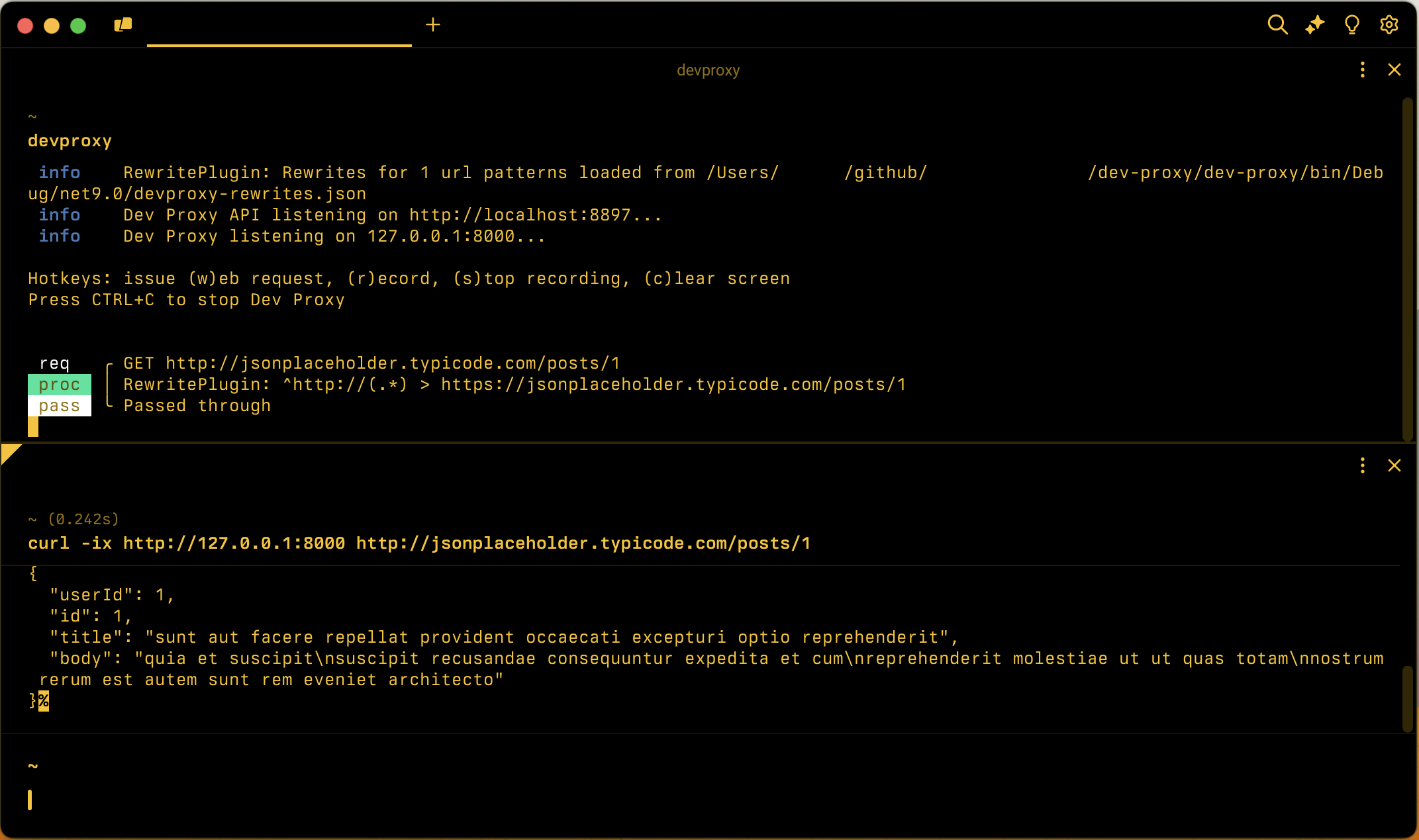
Configuration example
{
  "$schema": "https://raw.githubusercontent.com/dotnet/dev-proxy/main/schemas/v4.0.0/rc.schema.json",
  "plugins": [
    {
      "name": "RewritePlugin",
      "enabled": true,
      "pluginPath": "~appFolder/plugins/DevProxy.Plugins.dll",
      "configSection": "rewritePlugin"
    }
  ],
  "rewritePlugin": {
    "$schema": "https://raw.githubusercontent.com/dotnet/dev-proxy/main/schemas/v4.0.0/rewriteplugin.schema.json",
    "rewritesFile": "rewrites.json"
  }
}
Configuration properties
| Property | Description | Default |
|---|---|---|
rewritesFile |
Path to the file containing rewrite definitions | rewrites.json |
Command line options
None
Rewrite file examples
Following are examples of rewrite rules.
Rewrite all requests from HTTP to HTTPS
Rewrite all requests from HTTP to HTTPS. In this context, all means all requests configured with Dev Proxy or the RewritePlugin.
{
  "$schema": "https://raw.githubusercontent.com/dotnet/dev-proxy/main/schemas/v4.0.0/rewriteplugin.rewritesfile.schema.json",
  "rewrites": [
    {
      "in": {
        "url": "^http://(.*)"
      },
      "out": {
        "url": "https://$1"
      }
    }
  ]
}
Set a request header
Set the Accept-Language header on all requests to https://api.contoso.com. If the request already has the header, the plugin replaces its value. If the header is missing, the plugin adds it. Because the rule doesn't specify an out URL, the plugin doesn't change the request URL.
{
  "$schema": "https://raw.githubusercontent.com/dotnet/dev-proxy/main/schemas/v4.0.0/rewriteplugin.rewritesfile.schema.json",
  "rewrites": [
    {
      "in": {
        "url": "^https://api\\.contoso\\.com/"
      },
      "out": {
        "headers": [
          {
            "name": "Accept-Language",
            "value": "nl-NL"
          }
        ]
      }
    }
  ]
}
Rewrite requests to a URL from an environment variable
Rewrite requests to https://api.contoso.com to the base URL stored in the API_BASE_URL environment variable, preserving the rest of the path.
{
  "$schema": "https://raw.githubusercontent.com/dotnet/dev-proxy/main/schemas/v4.0.0/rewriteplugin.rewritesfile.schema.json",
  "rewrites": [
    {
      "in": {
        "url": "^https://api\\.contoso\\.com/(.*)"
      },
      "out": {
        "url": "${env:API_BASE_URL}/$1"
      }
    }
  ]
}
Mocks file properties
| Property | Description | Required |
|---|---|---|
rewrites |
Array of rewrite objects that defines the list of rewrite rules that the RewritePlugin applies to the requests it intercepts | yes |
Rewrite object
Each rewrite rule has the following properties:
| Property | Description | Required |
|---|---|---|
in |
Rewrite pattern to match the incoming request. | yes |
out |
Rewrite pattern to rewrite the request | yes |
Remarks
If the request that the RewritePlugin intercepts, doesn't match all properties defined in the in pattern, the plugin doesn't apply the rewrite rule to the request.
Rewrite pattern
Each rewrite pattern has the following properties:
| Property | Description | Required | Default value | Sample value |
|---|---|---|---|---|
url |
In the in pattern, regular expression that the plugin applies to the URL. In the out pattern, URL to rewrite the request to. If you omit it in the out pattern, the plugin doesn't change the request URL. | yes in in, no in out | ^http://(.*) |
|
headers |
Array of request headers to set on the request. Supported only in the out pattern. | no |
Remarks
The out pattern must specify url, headers, or both.
If you use capture groups in the regular expression in the in patterns, you can refer to them in the out pattern. For example, if you want to rewrite http://example.com/foo to https://example.com/foo, you can use the following rewrite rule:
{
  "$schema": "https://raw.githubusercontent.com/dotnet/dev-proxy/main/schemas/v4.0.0/rewriteplugin.rewritesfile.schema.json",
  "rewrites": [
    {
      "in": {
        "url": "^http://(.*)"
      },
      "out": {
        "url": "https://$1"
      }
    }
  ]
}
In the out URL, you can reference environment variables using the ${env:VAR_NAME} syntax. Dev Proxy inserts the value of the environment variable as-is, so the value can also refer to capture groups from the in pattern. Dev Proxy resolves environment variables only for requests that match the in pattern and doesn't expand environment variables in the in pattern. If a referenced environment variable isn't set, Dev Proxy logs an error and skips the rewrite rule.
Request header
Each request header has the following properties:
| Property | Description | Required |
|---|---|---|
name |
Name of the request header | yes |
value |
Value to set for the request header | yes |
Remarks
The plugin matches header names case-insensitively. If the request already has the header, the plugin replaces its value. If the header is missing, the plugin adds it.
The plugin sets headers only on requests whose URL matches the in URL pattern. The plugin evaluates the match before it applies the URL rewrite of the same rule, so when a rule rewrites both the URL and headers, the headers apply to the same requests as the URL rewrite.
You can reference environment variables in header values using the ${env:VAR_NAME} syntax. Dev Proxy resolves them the same way as in the out URL, and skips the rewrite rule if a referenced environment variable isn't set. Header values don't support capture groups from the in pattern.
Collaborate with us on GitHub
The source for this content can be found on GitHub, where you can also create and review issues and pull requests. For more information, see our contributor guide.
